
Caching
The Maho Storefront uses a three-tier caching strategy to deliver sub-100ms responses globally while keeping content fresh.
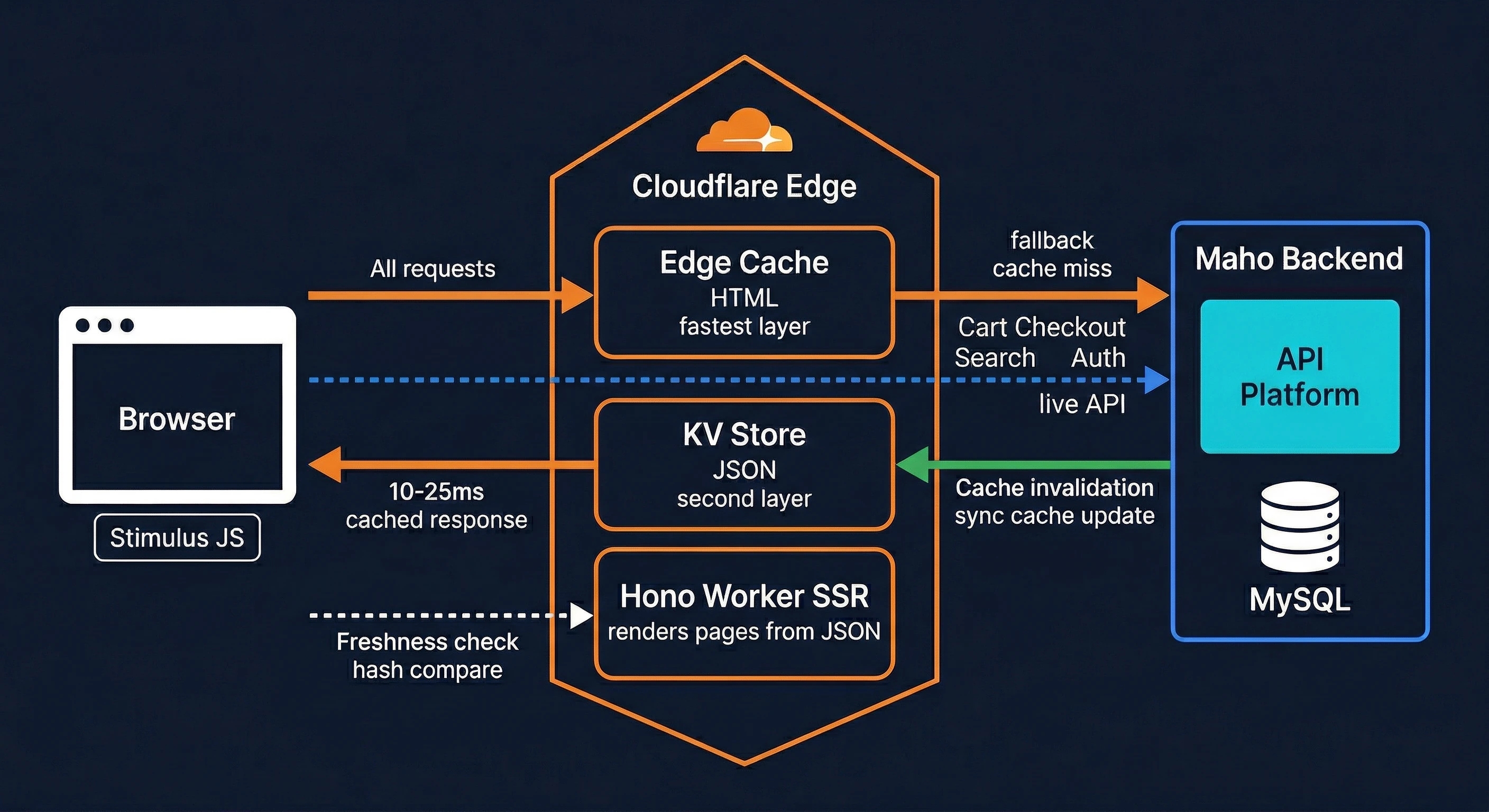
Cache Tiers
Tier 1: Cloudflare Edge Cache
HTML responses are cached at each Cloudflare PoP (Point of Presence). Each PoP maintains its own cache - a cache in Sydney doesn't serve requests routed to Singapore.
TTLs by content type:
| Content | Edge TTL | Rationale |
|---|---|---|
| Homepage | 30 min | Frequently updated promotions |
| Category pages | 2 hours | Product additions/removals |
| Product pages | 4 hours | Price/stock changes less frequent |
| CMS pages | 2 hours | Content updates |
| Blog posts | 4 hours | Rarely changed |
| Static assets (CSS/JS) | 1 year | Immutable, hash-versioned |
These TTLs are defined as constants at the top of src/index.tsx (~line 188) and can be adjusted per deployment:
// src/index.tsx
const CACHE_HOME     = 1800;   // 30 min
const CACHE_CATEGORY = 7200;   // 2 hours
const CACHE_PRODUCT  = 14400;  // 4 hours
const CACHE_CMS      = 7200;   // 2 hours
const CACHE_BLOG     = 14400;  // 4 hours
TIP
These TTLs can safely be extended (e.g. to 7 days) because the freshness controller detects stale content on every page load, and observer-driven sync auto-invalidates edge caches whenever data changes in the admin. The TTL is a ceiling, not a guarantee of staleness.
Browser headers:
Cache-Control: no-cache
ETag: "v1abc.p2def"
The no-cache directive forces browsers to revalidate with the edge on every request, but the ETag allows 304 Not Modified responses when content hasn't changed.
Tier 2: Cloudflare KV
All catalog data is stored in Cloudflare KV with store-prefixed keys:
| Key Pattern | Data |
|---|---|
{store}:config | Store configuration |
{store}:categories | Category tree |
{store}:product:{urlKey} | Individual product |
{store}:products:category:{id}:page:{n} | Product listing page |
{store}:cms:{identifier} | CMS page content |
{store}:blog:{identifier} | Blog post |
{store}:countries | Country list |
TTL behavior:
- Sync-written data (via
/syncendpoint): No TTL - persists until next sync - Fallback-fetched data (on KV miss): 24-hour TTL
Tier 3: Origin API
The Maho backend is the source of truth. It's accessed via MahoApiClient when:
- KV doesn't have the requested data
- A freshness check determines the data is stale
- A full sync is triggered
Cache Invalidation
Event-Driven Sync (Primary)
The Maho admin module keeps KV current automatically. Any product, category, CMS page, or config save in the Maho admin fires an observer that queues a sync. A cron job processes the queue every minute, pushing only the changed entities to KV. This means KV data is typically less than 1 minute behind the admin.
Automatic Edge Invalidation
Edge cache invalidates automatically when the version tag changes:
Version Tag = ASSET_HASH.pulseHash- Code deploy →
ASSET_HASHchanges → all edge caches miss - Data sync →
pulseHashchanges → all edge caches miss
Manual Invalidation
The /cache/purge endpoint purges specific URLs or patterns:
curl -X POST https://your-store.com/cache/purge \
  -H "Content-Type: application/json" \
  -d '{"secret": "your-secret", "urls": ["/product-url"]}'
Freshness Controller
Client-side JavaScript checks if the currently displayed page is still fresh by comparing version fingerprints. If stale, a background revalidation is triggered - the user sees the cached version immediately, and the next request gets fresh content.
See Freshness for details.
Never-Cached Routes
User-specific pages are never cached at any tier:
/cart- Cart contents/checkout- Checkout flow/account/*- Account dashboard/search- Search results/login,/register- Authentication
These routes always execute the Worker handler, hitting KV for catalog data but rendering with real-time cart/account state.
Cache Architecture by Layer
Source: src/index.tsx, CACHING.md